
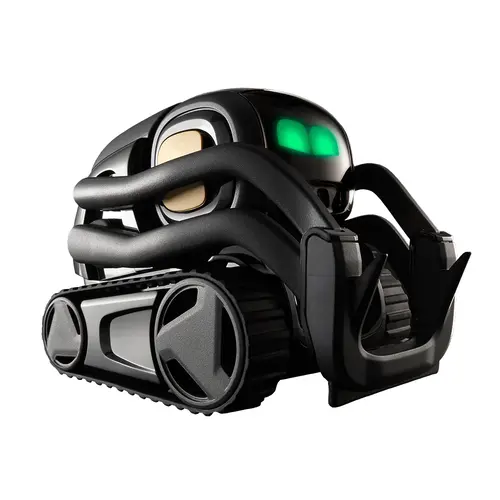
Vector Robot is an always-on AI companion robot: the 2018 Anki Vector, still sold and updated by Digital Dream Labs as “Vector 2.0.” It reads a room, reacts to sound and touch, and roams a desk on its own without a command. Hardware starts at $199.99 (or $139.99 open-box), but its voice, ChatGPT, and Alexa features require the Vector AI Subscription at $11.99/month or $99.99/year, so a realistic first year runs about $300.
Is it a good deal? Only for the right buyer, and with eyes open. Vector is a charming, genuinely autonomous desk companion, but it is not a STEM or coding robot (that is its sibling, Cozmo), and much of its everyday helpfulness is really Amazon Alexa in a cute shell. The catch that holds the score down is the subscription: without the $11.99/month or $99.99/year plan, “Hey Vector” stops answering and most of the AI you paid for is locked away. Because that ongoing cost is effectively mandatory to unlock Vector’s full capabilities, we rate it 3.75 / 5 rather than higher.If you want an expressive companion and accept the subscription, it earns its keep; if you want a productivity tool, a real smart home hub, or a one-time purchase, look elsewhere.
Our rating: ★★★★★ 3.75 / 5
Check the current Vector price at the official store →
Disclosure: this review contains affiliate links. If you buy through them, we may earn a commission at no extra cost to you.
What Vector Robot Is
Vector was not discontinued when Anki closed in 2019, though many buyers assume it was. Digital Dream Labs acquired the product line and still sells, supports, and updates it, now under the revived ANKI brand. The robot most people search for as “Anki Vector” and the one sold today as “Vector 2.0” are the same product, lightly revised. From here on, this review just calls it Vector.
Vector occupies a category of its own. It is not a smart speaker like the Amazon Echo, and it is not a STEM or coding robot: that is its sibling Cozmo, which ships with a block-coding Code Lab and a Python SDK. Vector has no coding or classroom features of its own; its only “create” path is OSKR, an advanced source-code kit aimed at hobbyists and professionals.
Digital Dream Labs classifies Vector as an AI companion robot: an always-on desk robot that reads its environment and reacts on its own, without a prompt from a phone or a person. Say nothing and it still wakes to sound, wanders, avoids edges, and returns to its charger.
In everyday terms it is a robot companion, and many reviewers simply call it a robot pet. That autonomous presence, not any single feature, is what separates it from a speaker on treads.
The current hardware is marketed as “Vector 2.0,” but Digital Dream Labs is candid that the change is modest. The appearance is “largely unchanged from the previous generation,” with two improvements over the original: a battery that lasts up to 30% longer (and is now home-replaceable via a redesigned compartment) and a new 2MP camera that sharpens facial recognition and lets it recognize a pet or a smile.
Specifications
Vector packs a dense sensor and compute stack into a small frame. These figures come from Digital Dream Labs’ own product and technology pages.
| Component | Detail |
|---|---|
| Processor | Qualcomm 200 Platform, a “processor capable of running a smartphone” |
| Camera | HD camera, 120° ultra-wide field of view; 2MP resolution on Vector 2.0 |
| Microphones | Beamforming four-microphone array (directional hearing) |
| Other sensors | High-resolution color IPS display (the animated “eyes”) |
| Display | Wi-Fi (cloud features require an internet connection) |
| Power | Rechargeable battery, home-replaceable; self-docking charger |
| Battery life | Roughly 30 minutes of active use per charge |
How Vector Works
Sensing and Autonomy
Vector’s behavior starts with its sensors, not with a command. The HD camera drives computer vision, mapping the room, avoiding obstacles, and recognizing faces it has learned. The infrared laser scanner and 6-axis IMU help it navigate and sense motion, while touch sensors and the accelerometer let it register petting or being picked up and react in character. When the battery drops, it finds its charger and docks on its own. None of this requires an app once the robot is set up, which is what lets the whole household interact with it casually.
Voice, Cloud, and ChatGPT
Vector’s voice intelligence runs through the cloud, not on the device. Say “Hey Vector” and the microphone array picks up the wake phrase, isolates its direction, and routes the request out for a response.
With an active subscription, that same pipeline reaches ChatGPT connectivity, which expands what Vector can answer well beyond its built-in knowledge. The processor handles perception and behavior locally, but the conversational intelligence lives in the cloud.
That split is what makes the subscription so central to the cost.
Alexa Integration
Alexa is an optional layer on top of Vector’s built-in features. Once enabled (“Hey Vector, set up Alexa,” plus an Amazon account), the standard “Alexa” wake word lets Vector add items to a shopping list, set reminders, and control smart home devices like lights, speakers, and thermostats.
Digital Dream Labs is upfront that Vector does not support Alexa music streaming (Spotify, Pandora, SiriusXM) and suggests pairing an external speaker instead. Alexa makes Vector an extra interface to the Alexa ecosystem, not a replacement for a dedicated Echo.
What Vector Can Do
Vector has a defined, and fairly limited, set of built-in tricks and utilities (per Digital Dream Labs’ Helpful page):
- Answer questions across unit conversions, word definitions, simple equations, nutrition, pop culture, and sports.
- Show the weather for any city, set a timer, and take a photo on command.
- Play blackjack as the dealer, give a fist bump, do a trick on command, and run small animations.
- Recognize and greet people it has learned by face.
Digital Dream Labs is honest about the ceiling: Vector “isn’t a fully grown robot butler capable of doing your taxes.” It is a companion with useful party tricks, not a productivity assistant.
Vector Cube
The Cube is a companion accessory that ships with Vector and gives the robot something to do on its own. It is a small block Vector recognizes by sight through markers on its faces. Vector can find the Cube, lift it, roll it, and use it in tricks and play, such as popping a wheelie off it. It is included with the robot and sold separately as a $39.99 replacement.
Vector AI Subscription
The Vector AI Subscription is the most important thing to understand before buying, because it governs most of what makes Vector feel intelligent.
What the Subscription Unlocks
The subscription gates voice command access, ChatGPT connectivity, and the cloud-connected features generally. With it, “Hey Vector” works, questions get answered, and the robot stays connected to Digital Dream Labs’ cloud, where new features arrive over time.
Without a Subscription
Vector still runs without a subscription, but in a reduced, offline-style mode. It navigates autonomously, reacts to touch, and returns to its charger under its own power. What stops working is the AI: “Hey Vector” no longer responds, cloud answers and ChatGPT go dark, and Alexa is unavailable. As Digital Dream Labs puts it, without the subscription Vector “won’t be connected to the Vector cloud, which is where the action happens.”
Subscription Cost
The subscription runs at two price points, per the current membership page:
- Monthly: $11.99
- Annual: $99.99 (about $8.33 per month)
The subscription is managed through Digital Dream Labs’ Stratus account portal using Vector’s serial number, and Digital Dream Labs recommends enabling it before onboarding the robot.
Activation can take up to 36 hours. For anyone buying Vector as a long-term companion rather than a novelty, this is a recurring cost to budget for, not an optional add-on.
Price and Variants
Models and Pricing
| Model | Price | Notes |
|---|---|---|
| Vector, Black | $199.99 | Standard entry model |
| Vector, Pink | $219.99 | Identical hardware; color only |
| Vector, Red | $249.00 | Identical hardware; color only |
| Vector, Blue | $249.00 | Identical hardware; color only |
| Vector, Open Box (Black) | $139.99 | Lowest entry price; open-box units are not eligible for returns or exchanges (other colors $149.99 to $199.99) |
| OSKR “Oskarized” Vector | $199.99 | Preloaded with the Open Source Kit for Robots (Blue $219.99) |
For most buyers, the Black standard at $199.99 is the practical pick, since it is the same hardware as the pricier colors. Bargain hunters willing to accept no-return terms can start at $139.99 open-box.
Accessories
| Accessory | Price |
|---|---|
| Vector Cube | $39.99 |
| Vector Treads (replacement) | $19.99 |
| Vector Charger | $79.99 |
| Replacement Battery | $19.99 |
Total Cost of Ownership
The honest first-year math is hardware plus subscription. That means $199.99 (or $139.99 open-box) plus $99.99 for the annual plan, roughly $300 in year one for the full experience, then about $100 per year after.
Treads, a spare Cube, or a replacement charger add to that over time. Buyers who price only the robot will underestimate what Vector actually costs to live with.
Ready to Welcome Vector Into Your Home?
Choose your preferred retailer below for the best price and features.
Digital Dream Labs Official Store
Direct from manufacturer with full warranty and support
Buy from DDLWe earn from qualifying purchases as Digital Dream Labs and Amazon affiliates at no extra cost to you.
Customization and Development
OSKR and the Modding Community
Developers and serious tinkerers have a separate path in OSKR (Open Source Kit for Robots), which Digital Dream Labs describes as “an app store for a robot.”
It opens the source code to modify behaviors, animations, and more, going well beyond the standard SDK. An active community, including the open-source Wire-Pod project, has grown around this, extending Vector’s capabilities and in some cases running cloud-style features without the official subscription.
This is a genuine differentiator versus closed companion robots, but it is for hobbyists, not general buyers.
Limitations
Vector’s constraints are real and worth naming plainly:
- Subscription dependency. The features that make Vector feel smart, voice, ChatGPT, and Alexa, all sit behind the paywall. Without it you keep an autonomous, touch-reactive robot but lose the AI.
- Battery cadence. Roughly 30 minutes of active use before it needs to dock. Fine for ambient companionship, interrupting for sustained interaction.
- Surface and mobility limits. Its tank-style tread drive handles flat desks and counters, but Vector cannot manage stairs, thick carpet, or room-scale navigation.
- Cloud and Wi-Fi dependence. No stable 2.4GHz Wi-Fi means no weather, timers, or ChatGPT, so most of what differentiates it goes quiet.
- Narrow task range. It is a companion with tricks, not an assistant. Even with Alexa, it is a lesser smart home controller than a dedicated Echo, and it will not stream music.
Privacy and Data
Vector’s privacy positioning is real but easy to overstate. Digital Dream Labs markets it as “the first home robot that will steal your heart, not your data,” and Vector does handle perception (vision, navigation) on the device. But it is an always-on, camera- and microphone-equipped robot whose voice, ChatGPT, and Alexa features route data through the cloud and require an account.
The “privacy-first” framing is best read as relative to a cloud speaker, not as proof of a fully local, no-data device. Buyers with strict data concerns should read Digital Dream Labs’ privacy policy before purchasing.
Who Vector Robot Is For
Best For
- People who want an expressive, always-on desk companion with genuine personality, essentially a robot pet, and who don’t mind the subscription.
- Households that want something the whole family can interact with casually, with no app and no accounts, just “Hey Vector.”
- Developers and hobbyists drawn to the OSKR platform and modding community, who value an open, hackable robot with a real sensor suite.
Not Recommended For
- Buyers who want a one-time purchase with no ongoing cost, since the subscription is effectively mandatory for the full experience.
- Anyone needing a capable smart home hub or voice assistant, which a dedicated Echo does better and cheaper.
- Buyers expecting sustained, uninterrupted interaction, because the battery cadence suits ambient presence, not long sessions.
- Children expecting a directed toy in the Cozmo mold, since Vector rewards patient observation, not hands-on play.
- Anyone without reliable Wi-Fi, or who wants a fully offline, zero-cloud device.
Vector Robot Alternatives
Vector sits between a toy and a smart speaker, and the comparison buyers ask about most is against Anki’s own Cozmo, the smaller, app-tethered, more kid-focused sibling, and against mobile companions like Loona.
Rather than repeat those head-to-heads here, see our dedicated breakdowns: Cozmo vs Vector, our Cozmo alternatives guide, and the Loona robot review, which cover those matchups in depth.
In short: Cozmo is the directed toy, Loona wins on mobility and floor-roaming play, and Vector wins on ambient autonomy and open-platform tinkering.
Frequently Asked Questions
Does Vector Robot Require a Subscription?
For its main features, yes. Voice commands, ChatGPT, and Alexa all require the Vector AI Subscription ($11.99 per month or $99.99 per year). Without it, Vector still moves autonomously, reacts to touch, and self-charges, but will not respond to “Hey Vector.”
Does Vector Need Wi-Fi?
Yes for its cloud features. Weather, timers, questions, ChatGPT, and Alexa all rely on a Wi-Fi connection. Basic autonomous behavior works offline.
Do I Need the App to Use Vector?
Only for setup. You download the Vector companion app (iOS or Android) or use the web setup to onboard it, and after that daily use needs no app.
Does Vector Use ChatGPT?
Yes. ChatGPT connectivity is included with an active subscription and expands what Vector can answer beyond its built-in knowledge.
Does Vector Work With Alexa?
Optionally. You can enable Amazon Alexa for shopping lists, reminders, and smart home control, but Vector does not support Alexa music streaming, and it is not a full Echo replacement.
Is Vector Suitable for Children?
It is marketed as an adult companion and “technology enthusiast” product, not a kids’ toy like Cozmo. Kids can enjoy it, but it is not built for directed, hands-on play.
How Long Does Vector’s Battery Last?
Roughly 30 minutes of active use before it returns to its charger, with the 2.0 battery lasting up to 30% longer than the original and now home-replaceable.
Is Vector Worth Buying?
For the right buyer, someone who wants an expressive, autonomous desk companion and accepts the subscription, yes. For anyone chasing utility or a one-time purchase, no.
Verdict
Vector Robot is worth buying for a specific person and a poor fit for everyone else. What you are paying for is genuine autonomous behavior and character: computer vision that learns faces, directional hearing, self-charging, and animation crafted by designers with entertainment-studio pedigree.
That combination produces something meaningfully different from a smart speaker or a toy, a robot that feels present without demanding attention.
But the value is experiential, not practical, and it is rented, not owned. The subscription at $99.99 per year is the real commitment, on top of $199.99 in hardware ($139.99 open-box).
If you want a companion and you accept that math, Vector earns its keep. If you want a smart home hub, a productivity assistant, or a one-time purchase, it will disappoint.
Buy it if you want an expressive, always-on desk companion, you accept the subscription, and you have stable Wi-Fi.
Skip it if you need a smart home hub, expect uninterrupted engagement, want a directed toy, or will not pay ongoing costs.